
Coupon
Coupon
If you want to give discounts on some specific products, coupons are required.
Well, to make coupons, click on the coupons option in the ‘Action’ menu on the left side of the Dashboard. Instantly, a form will appear that you have to fill out to create a coupon. In the products field, you must specify the products to which the coupon will apply.
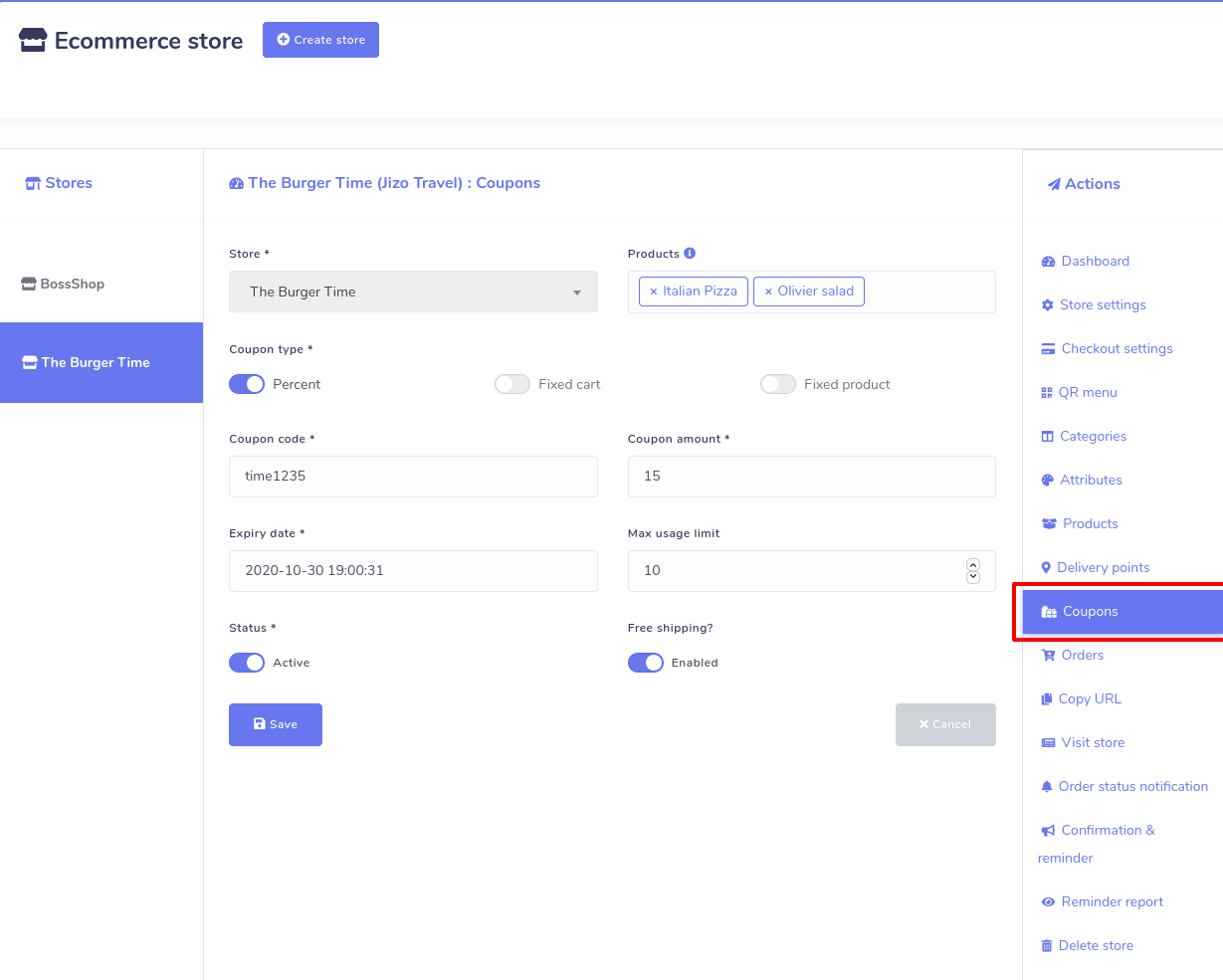
In Dashrite Muilti-Marketing App’s e-commerce store, you can make three types of coupons: Percent, Fixed cart, and Fixed products. Now, you must select any of the three types of coupon codes. Before choosing, you have to understand the functionality of each type of coupon.
Let’s explain them:
Percent– Percent coupon type applies only to selected products. For example, if the cart contains three (3) t-shirts @ $20 each = $60, a coupon for 10% off applies a discount of $6.
Fixed cart –A fixed total discount for the entire cart. For example, if the cart contains three (3) t-shirts @ $20 each = $60, a coupon for $10 off gives a discount of $10. This coupon type will apply to all the products you have added to the cart, whether you have selected the products or not.
Fixed product – A fixed total discount is available for selected products only. Customers receive a set discount per item. For example, three (3) t-shirts @ $20 each with a coupon for $10 off apply a discount of $30.
Then you have to fill out the following boxes:
Coupon Code- Now give the code for the coupon. Your customers will use the code to get discounts on the products the coupon applies to.
Coupon amount- Then you have to provide the coupon amount. Depending on your discount type, the coupon amount will be a Fixed value or percentage. Enter the amount without a currency unit or a percent sign, which will be added automatically based on the discount type you choose, e.g., Enter ’10’ for £10 or 10%.
Coupon expiry date– The coupon should expire and can no longer be used.
Max usage limit- You must specify the number of times the coupon could be used before the expiration date.
Coupon deactivates- You can deactivate the coupon anytime by turning off the status button.
Free shipping – If you enable Free shipping, the shipping cost will be removed when the coupon is used.