E-commerce
E-commerce
eCommerce
An E-commerce store is a unique feature of Dashrite Muilti-Marketing App, the world’s best marketing software. With this feature, you can generate a virtual restaurant that will be opened inside Facebook Messenger and on the browser.
After creating your virtual restaurant, it will provide you with two QR codes: Messenger and Browser. You just have to supply the QR codes to your customers. Just as your customers scan the Messenger QR code straightway, your virtual shop opens inside your messenger. Likewise, just as they scan the QR code, your virtual shop will open on their browsers. Because of the QR codes, your customers will get rid of finding your Facebook page, sending messages, and entering your virtual restaurant’s link on their browsers.
Besides, the virtual restaurant will provide two URLs under the QR codes– Messenger url and browser url. Like QR codes, the Messenger url will be open inside the messenger, and the browser url will be open on the browser.
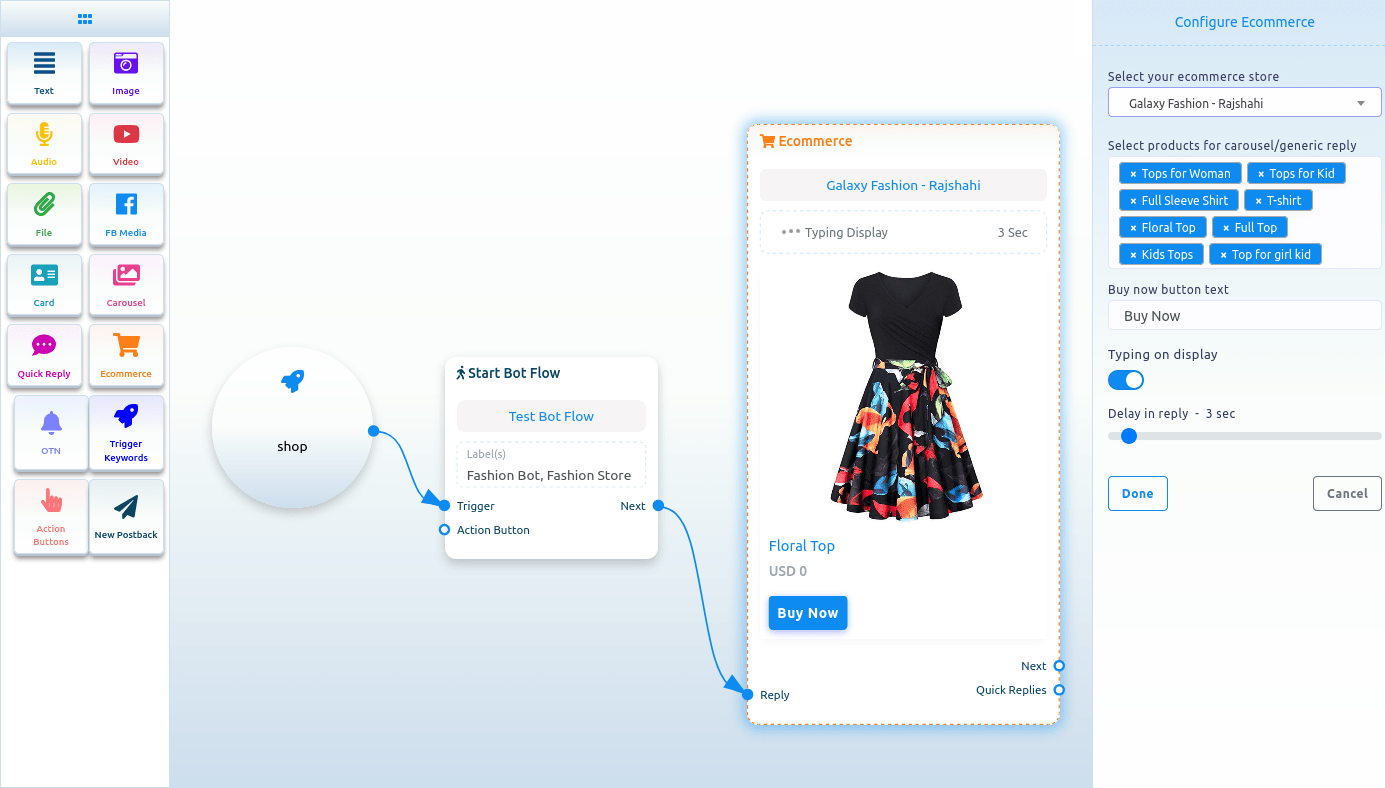
To add an E-Commerce component, drag it from the Doc menu and drop it on the editor. The E-Commerce component will instantly appear in the editor.
Now, double-click on the E-Commerce component, and a right sidebar called configure E-Commerce with some fields will appear. First, you have to select an e-commerce store. Click on the Select your E-Commerce store field, and a drop-down menu of predefined stores will appear. To configure the E-Commerce component, you first have to create stores.
After you have selected a store, you have to choose products for the carousel/ generic reply. A drop-down menu of different products will appear just as you click on the field. Now select products from the drop-down menu. Of course, you can select multiple products. Then you have to write text for the buy now button. Also, you can enable typing on display and choose delay time in seconds. Now click on the done button.
Then, you have to connect the e-commerce component with another component.
The products you have selected will appear in the messenger as a carousel/generic template. The user can buy the product by clicking on the buy now button.