
Services
Types of service:
- Types of service are mostly used in restaurants, for example, Dine-in, Parcel, Courier, 3rd Party Delivery, etc.
- Based on the type of service, you can change the price of the product by linking the types of services to the selling price group.
- You can add packing charges (fixed or percentage)
- Also, you can add more information, like in custom fields.
Enabling Types of Service
Go to Settings -> Business Settings -> Modules -> Check the “Types of Service”
and save it.
Adding new Types of Service
- To add, go to Settings -> Types of service -> Add
- Add a name and description
- For each location, select the applicable Price Group. Select the default selling price for the product.
- Enter packing charge, and leave empty if not applicable.
- Enable custom field: This will enable some custom fields for the type of service on the POS screen.
Using Type of Service in POS/sales screen:
- On Enabling Types of Service in the POS screen, you will see the option to select the Type of service.
- Before adding a sale, select the type of service and enter the relevant details.
- You can show the type of service information in the receipt by enabling it from the Invoice Layout
Shipments, Home Delivery, or parcel management
While adding shipment details during a sale, the delivery person can also be added.
Adding Delivery Note for Sale
How do we print the Delivery Receipt?
To add a delivery note, follow the steps below.
Step 1: While adding the sales, be sure to include shipping details
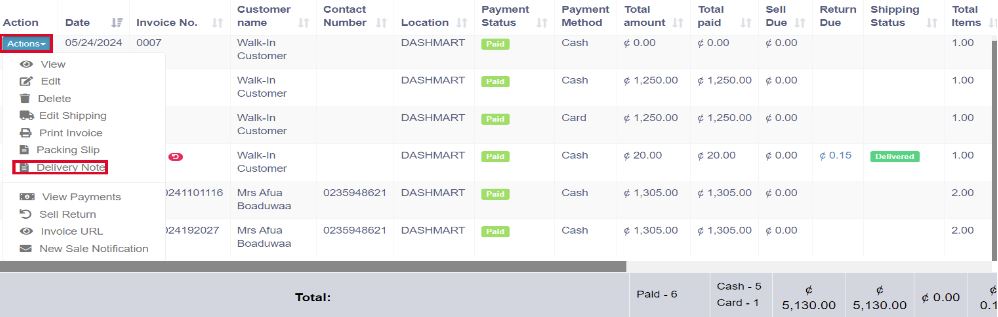
Step 2: Navigate to the All Sales screen and click on the Action dropdown menu for the specific sale added in Step 1.
Step 3: From the Action dropdown menu, select the ‘Delivery Note‘ option and proceed to print the delivery note directly.
Display product unit price in POS Product suggestion
To display product unit price in POS product suggestion follow the below steps:
Go to Business Settings > POS > Enable “Show pricing on product suggestion tooltip”
and save it.
Then in POS screen Product suggestion tooltip, it will show the product unit price