
Sendings
Sending domains
Sending domains in the Dmail Marketing application refer to those (email) authorized to send emails on behalf of your organization. These domains are added to the Dmail Marketing application to establish trust and improve deliverability. By verifying and adding sending domains, you can demonstrate to email providers that your emails are legitimate and not spam. This helps ensure your emails reach the recipients’ inboxes without being marked as spam.
Maintaining a good domain reputation for sending emails is essential to ensure email delivery. Authentication, consistent sending behavior, and recipient engagement can all impact a sending domain’s reputation.
How to add Sending domains /Sending Identity
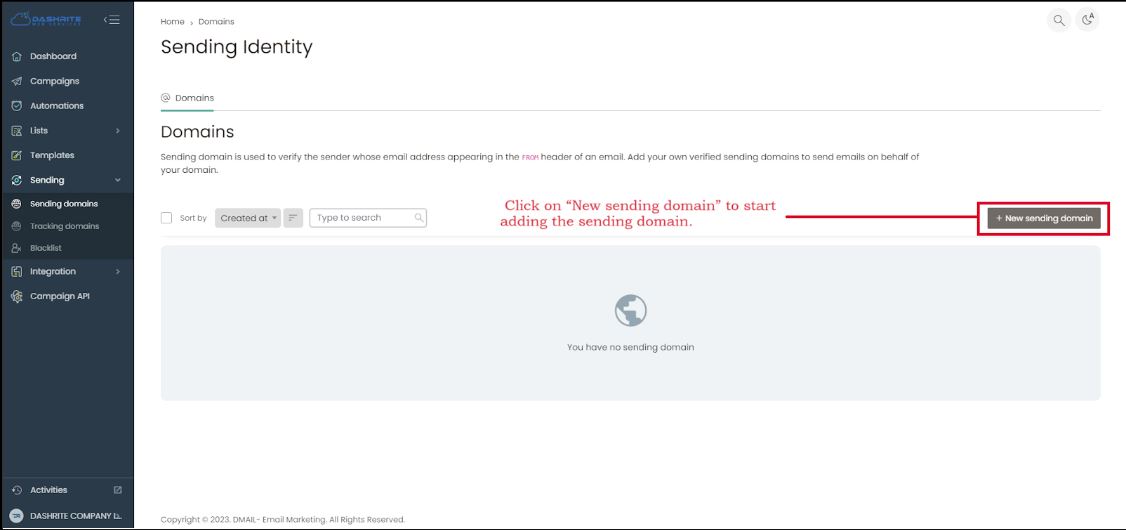
To add or manage Sending Identity, check your left dashboard panel. When you click Sending, the sending domain will be below the Sending section.
To add and manage the sending domain, click “sending domain.” Then, click on “New sending domain” to start adding the sending domain.