
Dmail Automations
Dmail Automations
Dmail—Email automation uses email technology to send targeted and personalized emails to a specific audience or individual based on certain triggers or actions. This can include automated welcome emails, follow-up emails, abandoned cart reminders, and more. Email automation helps businesses save time, increase efficiency, and quickly deliver relevant content to their subscribers.
Automation Trigger
A trigger is the action that starts an automation. For example, the system can trigger an automated email when someone subscribes to your audience or purchases a particular product. The system provides many preset automation types with built-in triggers, ranging from abandoned cart emails to a simple welcome message.
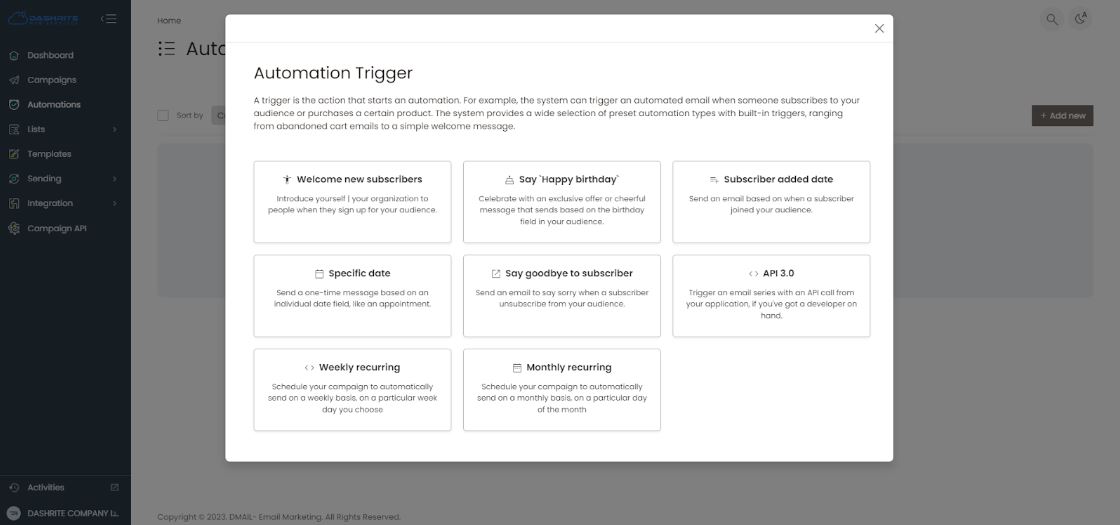
Welcome new subscribers
Introduce yourself | your organization to people when they sign up for your audience.
Say `Happy Birthday`
Celebrate with an exclusive offer or cheerful message based on your audience’s birthday field.
Subscriber added date
Send an email based on when a subscriber joins your audience.
Specific date
Send a one-time message based on an individual date field, like an appointment.
Say goodbye to subscribers.
Send an email to say sorry when a subscriber unsubscribes from your audience.
API 3.0
If you have a developer on hand, trigger an email series with an API call from your application.
Weekly recurring
Schedule your campaign to be sent every week on a particular weekday you choose automatically.
Monthly recurring
Schedule your campaign to automatically send every month on a particular day of the month.