
Howdy! How can we help you?
Dashforms Generator
Pre-Fill forms from URL parameter in Dashforms Generator:
Dashforms generator supports prefilled forms based on URL parameters.
Steps to generate URL to pre-fill form values:
- Go to the edit form for which you want to generate URL.
- In the edit form, click on the form field you want to be prefilled.
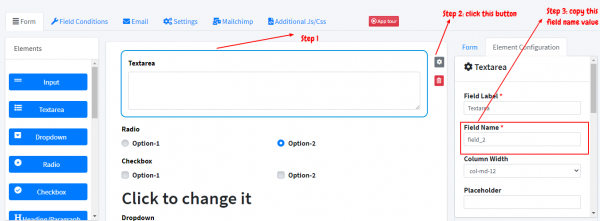
3. Copy the Form-Name value (check the screenshot above)
For example, if the form URL is https://dforms.dashrite.com/tor.forms/test-1gv/forms/test-1gv
The new URL, which will pre-fill a field with the name field_2, will be
https://dforms.dashrite.com/tor.forms/test-1gv?field_2=value
Similarly, if there are multiple fields having names like
https://dforms.dashrite.com/forms/test-1gv?field_2=value&anotherField=someValue&onemorefield=AnotherValue
In technical terms, we’ll need to pass the value as a key-value pair to get the parameter